30 Halloween Mockup Templates – A Practical Guide for Digital Sellers
Seasonal product design carries its own rhythm. Each holiday brings a fresh wave of buyer expectations, and Halloween stands out as one of the most visually driven celebrations in the digital marketplace. Sellers on platforms like Etsy often face the same recurring challenge: how to present seasonal offerings in a way that feels timely, polished, and consistent without starting from scratch every time. That is where a structured set of pre-designed templates becomes relevant. The collection known as 30 Halloween Mockup Templates offers one such resource, and understanding what it contains, how it compares to other approaches, and where it fits into your workflow can help you decide whether it aligns with your current needs.
What Are 30 Halloween Mockup Templates?
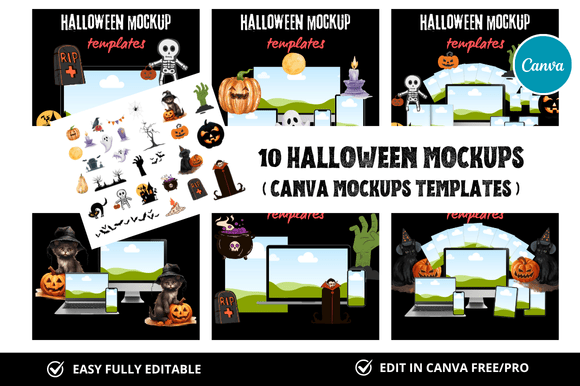
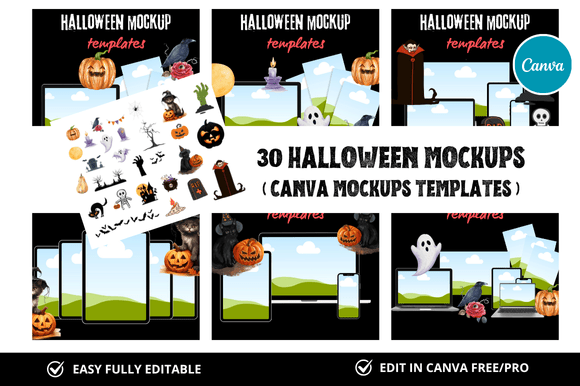
At its core, this product is a bundle of thirty editable design files built for use in Canva. Each template is sized at 2500 x 2000 pixels, which makes it suitable for square listings, shop banners, social media posts, and other visual assets commonly used on Etsy and similar platforms. The key differentiator here is the combination of quantity, format, and the inclusion of bonus freebies. You are not purchasing a single mockup or a small set of generic backgrounds. Instead, you are receiving a curated library of Halloween-themed canvases that can be customized through Canva’s link-based editing system.
What makes this bundle distinct is its focus on instant usability. Because the templates are delivered as Canva links, you do not need advanced design software like Photoshop or Illustrator. Anyone with a free or pro Canva account can open a template, replace text, swap images, adjust colors, and download the final result. This lowers the barrier for sellers who want professional-looking visuals but lack formal design training. The bundle is also marketed specifically toward Etsy digital shop owners, so the dimensions and layout styles are tailored to that platform’s listing requirements.
Comparing Approaches: Template Bundles vs. Custom Design vs. DIY
When evaluating a resource like 30 Halloween Mockup Templates, it helps to place it alongside the other common routes sellers take. Each approach has its own set of tradeoffs, and the right choice depends on your timeline, budget, skill level, and volume of listings.
Custom design from a freelancer offers maximum uniqueness. You can request specific colors, layouts, and imagery that match your brand exactly. However, this route is expensive and time-consuming. A single custom mockup can cost anywhere from twenty to over a hundred dollars, and turnaround times can stretch into days or weeks. For a seasonal event like Halloween, where the selling window is narrow, this approach may not scale efficiently.
DIY design using raw tools gives you complete creative control, but it demands a significant time investment. Learning to build mockups from scratch in Canva or other software takes practice. You also need to source your own graphics, fonts, and backgrounds, which adds complexity. For sellers who produce hundreds of listings per season, DIY can become a bottleneck.
A pre-made template bundle sits between these two extremes. With 30 Halloween Mockup Templates, you get a ready-to-use foundation that still allows for customization. You can change text, swap in your own product images, adjust colors to match your brand palette, and rearrange elements as needed. The tradeoff is that you are working within a predefined structure. If you need a very specific layout or a niche theme not included in the bundle, you may need to combine templates or supplement with custom elements.
Strengths of This Template Collection
The most apparent strength is the sheer volume of options. Thirty templates give you enough variety to cover multiple product categories, listing types, and promotional channels. You might use one set for your shop banner, another for individual product mockups, and several more for social media posts or email headers. Having a cohesive visual theme across all these touchpoints strengthens brand recognition without requiring you to design each asset independently.
The instant download and Canva link delivery model is another practical advantage. Once you purchase the bundle, you can access the templates immediately. There is no waiting for files to be prepared or for a designer to respond. This matters during the Halloween season when timing can make the difference between a strong sales month and a missed opportunity.
Another strength worth noting is the inclusion of bonus freebies. While the exact contents of the freebies vary, they typically add extra value beyond the core thirty templates. This could include additional backgrounds, graphic elements, or complementary mockups that expand your creative options. For sellers who are just starting out or who want to test different visual styles, these extras provide low-risk experimentation.
Tradeoffs and Limitations
No resource is perfect for every situation, and this bundle has its own set of limitations. The most significant is that you are working within Canva’s design environment. While Canva is user-friendly and accessible, it does not offer the same depth of control as professional design software. Advanced features like precise layer management, custom typography kerning, or complex masking are limited. If your brand demands highly specific graphic treatments, you may find the templates restrictive.
Another consideration is the seasonal nature of the templates. Halloween is a one-month event, and these designs are clearly thematic. You cannot repurpose a Halloween mockup for a Christmas or Valentine’s Day listing without significant modification. This means the bundle has a defined shelf life each year. If you sell year-round across multiple holidays, you may need additional template sets for other seasons.
There is also the question of uniqueness. Because these templates are sold to multiple buyers, other sellers in your niche could be using the same designs. While customization options allow you to differentiate your mockups to some degree, the underlying layout and graphic elements may appear similar across shops. If standing out with a completely one-of-a-kind visual identity is critical for your brand, a custom design approach might be more appropriate.
Decision Factors: Is This Bundle Right for You?
Choosing whether 30 Halloween Mockup Templates fits your needs comes down to a few practical considerations. The first is your production volume. If you plan to list dozens of Halloween products and need visual assets quickly, the bundle saves hours of manual design time. The second factor is your design comfort level. If you are comfortable making basic edits in Canva but not skilled at building layouts from scratch, these templates give you a reliable starting point.
Another factor is your budget. At a fraction of the cost of custom design work, a template bundle offers strong value for sellers who want professional results without a large upfront investment. If you are testing the seasonal market for the first time and are unsure how much inventory to create, starting with affordable templates helps you minimize financial risk.
Your brand’s visual consistency also matters. If you already have a defined brand style with specific fonts, colors, and imagery, you should verify that the templates can be adapted to match. Most Canva-based templates allow color and text changes, but some graphic elements may be fixed. Reviewing a preview of the bundle before purchase can help you assess whether the designs align with your brand direction.
Practical Examples and Use Cases
Consider a seller who runs an Etsy shop selling digital planner inserts. For Halloween, they want to offer a limited-edition set of spooky-themed planner pages. With the template bundle, they can open a mockup, insert a screenshot of their planner insert, adjust the background color to match their shop aesthetic, and add a promotional headline. The same process can be repeated for multiple products, resulting in a consistent look across their entire Halloween collection.
Another example is an Etsy seller who produces printable wall art. They need listing images that show their artwork framed on a wall, styled with Halloween decorations. The templates might include scenes with pumpkins, cobwebs, or candle-lit settings. By replacing the placeholder artwork with their own design, they can produce lifestyle-style product photos without staging a physical photoshoot.
A third use case involves a seller who wants to update their Etsy shop banner and social media covers for the season. Instead of designing three separate assets, they can select three templates from the bundle that share a common color scheme and typography, then customize each one for its specific purpose. This creates a cohesive storefront and social media presence with minimal effort.
When You Might Need Another Option
There are scenarios where this bundle may not be the best fit. If you sell physical products that require realistic, product-specific mockups—such as t-shirts, mugs, or home decor items—you may need templates that allow precise product placement and realistic lighting. While the bundle includes general mockup styles, it is designed primarily for digital product sellers. Physical product sellers may benefit more from industry-specific mockup generators or custom photography.
Additionally, if you have a very specific niche within the Halloween market—such as gothic, minimalist, or vintage-inspired aesthetics—you may find the templates’ default style too broad. In that case, you might use the bundle as a base and invest extra time in customization, or you could seek out a niche-specific template set that aligns more closely with your vision.
Making an Informed Decision
Ultimately, the value of 30 Halloween Mockup Templates lies in its balance of convenience, cost, and creative flexibility. It is not a replacement for bespoke design, nor is it intended to be. It is a practical tool for sellers who need to produce seasonal visuals efficiently while maintaining a professional appearance. By understanding what this bundle offers and where it fits within the broader landscape of design resources, you can decide whether it supports your goals for the Halloween selling season.
Before purchasing, consider reviewing sample templates if available, checking the compatibility with your current Canva account type, and thinking through how the designs will integrate with your existing listing images. With the right expectations and a clear plan for customization, a template bundle like this can save hours of work and help you focus on what matters most: creating products your customers will love.