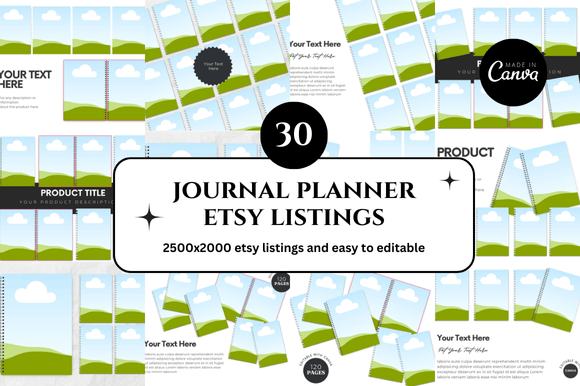
30 Planner Journal Etsy Listings Mockup for Creative Sellers
When you run an Etsy shop focused on planners, journals, or printable digital products, the way you present each listing can make a real difference. Shoppers scroll through countless thumbnails, and a polished, cohesive mockup often determines whether they stop to read your description or keep moving. A 30 Planner Journal Etsy Listings Mockup bundle offers a straightforward way to create professional visuals without starting from scratch every time. Instead of designing each listing image individually, you get a ready-to-use system that keeps your shop looking consistent and credible.
This particular collection includes 30 square Canva mockup templates sized at 2500 x 2000 pixels, designed specifically for planner and journal sellers. The instant download format means you can begin customizing within minutes, and the included bonus freebies add extra value for those who want to expand their visual toolkit. Whether you sell daily planners, habit trackers, bullet journals, or printable bundles, having a set of cohesive mockups helps your products stand out while saving hours of repetitive design work.
Why a Cohesive Mockup Set Matters for Your Etsy Shop
First impressions on Etsy happen fast. Potential buyers often judge a listing within a second or two based on the thumbnail image. If your mockups look inconsistent—some dark, some light, some with cluttered backgrounds—your shop can appear less trustworthy. A unified set of 30 mockups solves this by giving every listing a similar look and feel. This consistency signals professionalism and makes your entire shop feel curated.
Beyond aesthetics, cohesive mockups also help with brand recognition. When a customer sees a familiar style across multiple listings, they begin to associate that visual language with quality. Over time, this builds trust and makes repeat purchases more likely. For sellers who offer multiple planner designs or journal variations, the 30 Planner Journal Etsy Listings Mockup provides enough variety to showcase different products while maintaining a unified shop identity.
Practical Benefits of Using Canva-Based Mockup Templates
Not every seller has advanced design skills or access to expensive software like Photoshop. Canva has become a popular choice because it runs in a browser, offers drag-and-drop editing, and includes a generous free tier. These mockup templates are built as Canva links, so you can open them directly in your account, replace placeholder images with your own designs, and adjust colors or text as needed. There is no steep learning curve, and even beginners can produce professional-looking results within an hour.
The 2500 x 2000 pixel size works well for Etsy listing images, which are typically displayed as squares on search results and category pages. This resolution also gives you room to add text overlays, bullet points, or callout badges without making the image feel crowded. If you later want to use the same mockups for social media or your own website, the square format adapts easily to Instagram, Pinterest, and product galleries.
Realistic Use Case: Launching a New Planner Collection
Imagine you have just finished designing a set of 10 weekly planner inserts. Without mockups, you would need to photograph each one against a clean background, adjust lighting, and edit the images to remove shadows. With the 30 Planner Journal Etsy Listings Mockup, you can simply drag your planner pages into the template frames, adjust the angle if needed, and export in minutes. The templates include multiple layouts—some showing the planner open on a desk, others featuring a flat lay with stationery accents. This variety helps shoppers imagine using the product themselves, which often leads to higher conversion rates.
Who Benefits Most from This Mockup Bundle
While any Etsy seller can use these templates, certain groups tend to get the most value. Freelancers and creative entrepreneurs who manage multiple shops or product lines will appreciate the time savings. Instead of recreating listing images for each new product, you can reuse the same mockup set with different inserts. This is especially useful during seasonal launches or when testing new planner formats.
Bloggers and educators who sell printable resources also benefit. If you offer lesson plans, budget worksheets, or goal-setting journals, the mockups help you present those downloads as tangible, useful items. Seeing a worksheet inside a planner or on a desk makes the product feel more real than a flat PDF icon ever could.
Small business owners and hobbyists who are new to Etsy often struggle with listing photography. A mockup template removes the need for props, lighting setups, or photography skills. You get a clean, professional image that looks like it was styled by a specialist, even if you are working from a coffee shop laptop.
How the Bonus Freebies Add Practical Value
The bundle includes bonus freebies, which typically means extra design elements such as background textures, additional frames, or coordinating graphics. These extras give you more flexibility when you want to create seasonal variations or themed listings. For example, you might use a warm-toned background for fall planner pages and a cooler one for summer designs. The bonus items also reduce the need to search for complementary assets elsewhere, keeping your workflow contained within one purchase.
That said, not every bonus item will fit every seller's brand. Some extras may feel too decorative for minimalistic shops, or too plain for those who prefer bold visuals. It is worth browsing the complete bundle before purchasing to ensure the style aligns with your existing aesthetic. If you are unsure, the preview images usually show the mockups and bonuses clearly, so you can decide before committing.
Considerations Before Choosing This Mockup Set
No product is a perfect fit for everyone. If your shop sells very large or oversized products such as wall calendars or poster-sized planners, the square 2500 x 2000 format may feel restrictive. The templates are designed for typical planner and journal sizes, so check the frame dimensions within the preview. Similarly, if you prefer highly realistic photography with natural lighting and textured surfaces, a Canva mockup might look too polished or flat compared to staged photos. Some buyers respond better to authentic images, while others prefer clean, graphic presentations. Understanding your target audience helps you choose the right approach.
Another consideration is the level of customization. While Canva templates are easy to edit, they do rely on Canva's built-in elements and fonts. If you want to use specific brand fonts that are not available in Canva, you may need to upload them separately or adjust your expectations. Most sellers find the available options sufficient, but it is worth checking if the templates rely heavily on fonts that you cannot access.
Strengthening Your Etsy Shop's Credibility
Etsy's algorithm tends to favor listings with high-quality images, as they lead to better click-through and conversion rates. Using a professional mockup set like this one can indirectly support your shop's search ranking over time. When more shoppers click on your listing and make a purchase, the algorithm interprets that as a positive signal. This does not mean mockups alone guarantee sales, but they remove one common barrier: the visual impression that makes someone trust your product enough to buy.
For sellers who want to scale, having a mockup system also simplifies collaboration. If you hire a virtual assistant or a freelance designer to create new listings, you can share the Canva template link and instructions, ensuring every listing maintains the same visual standards. This is especially helpful during busy periods like the holiday season or back-to-school launches when you need to publish multiple products quickly.
Saving Time Without Sacrificing Quality
The most immediate benefit most users report is time saved. Designing a single listing image from scratch can take 20 to 30 minutes when you factor in background removal, sizing, and compositing. With a template, that drops to five minutes or less. Over 30 listings, the time savings add up to several hours. For sellers who also manage inventory, customer messages, and social media, those hours can be redirected toward higher-value tasks like product development or marketing.
This efficiency does not require compromising on quality. The templates are built with clean layouts, balanced composition, and enough whitespace to keep text readable. You are not forced into a cookie-cutter look because you can swap colors, change backgrounds, and rearrange elements within Canva. The result is a professional image that still feels personal to your brand.
Who Should Compare Options Before Buying
If your shop primarily sells digital products that do not resemble physical planners—such as SVG cutting files, embroidery patterns, or digital wall art—this mockup bundle may not match your product format. In that case, look for mockups designed specifically for flat digital assets or fabric-based products. Similarly, if you require non-square aspect ratios for Etsy listing videos or tall banners, you may need a separate set for those formats. This bundle focuses on square images, which cover the majority of Etsy listing needs but not every possible use case.
For sellers who already have a large library of custom photography and do not struggle with consistency, adding a mockup set may feel redundant. However, even established shops can benefit from having a backup template for quick posts, especially when launching a new product late at night or on weekends when photography setups are not available.
Final Thoughts on Using Mockups to Support Your Goals
A 30 Planner Journal Etsy Listings Mockup bundle serves as a practical tool, not a magic solution. It helps you present your products in a clear, attractive way without requiring advanced design skills or expensive equipment. The real value lies in the time it frees up and the consistency it brings to your shop. When every listing looks deliberate and professional, shoppers feel more confident clicking, reading, and buying.
If you are a planner seller, journal creator, or printable shop owner who wants to streamline your workflow and improve your shop's visual appeal, this type of mockup set is worth considering. It fits naturally into a Canva-based routine and gives you a solid foundation for future listings. The bonus freebies and instant download format remove friction, allowing you to focus on what matters most: creating products that help your customers stay organized, inspired, and productive.